


























1 / 2
0
Views
0
Downloads

0.0
0
0 Likes
Area Within Triangles: Geometry Worksheet
0 Views
0 Downloads
Paste this activity's link or code into your existing LMS (Google Classroom, Canvas, Teams, Schoology, Moodle, etc.).
Students can open and work on the activity right away, with no student login required.
You'll still be able to track student progress and results from your teacher account.
Information
Description
What It Is:
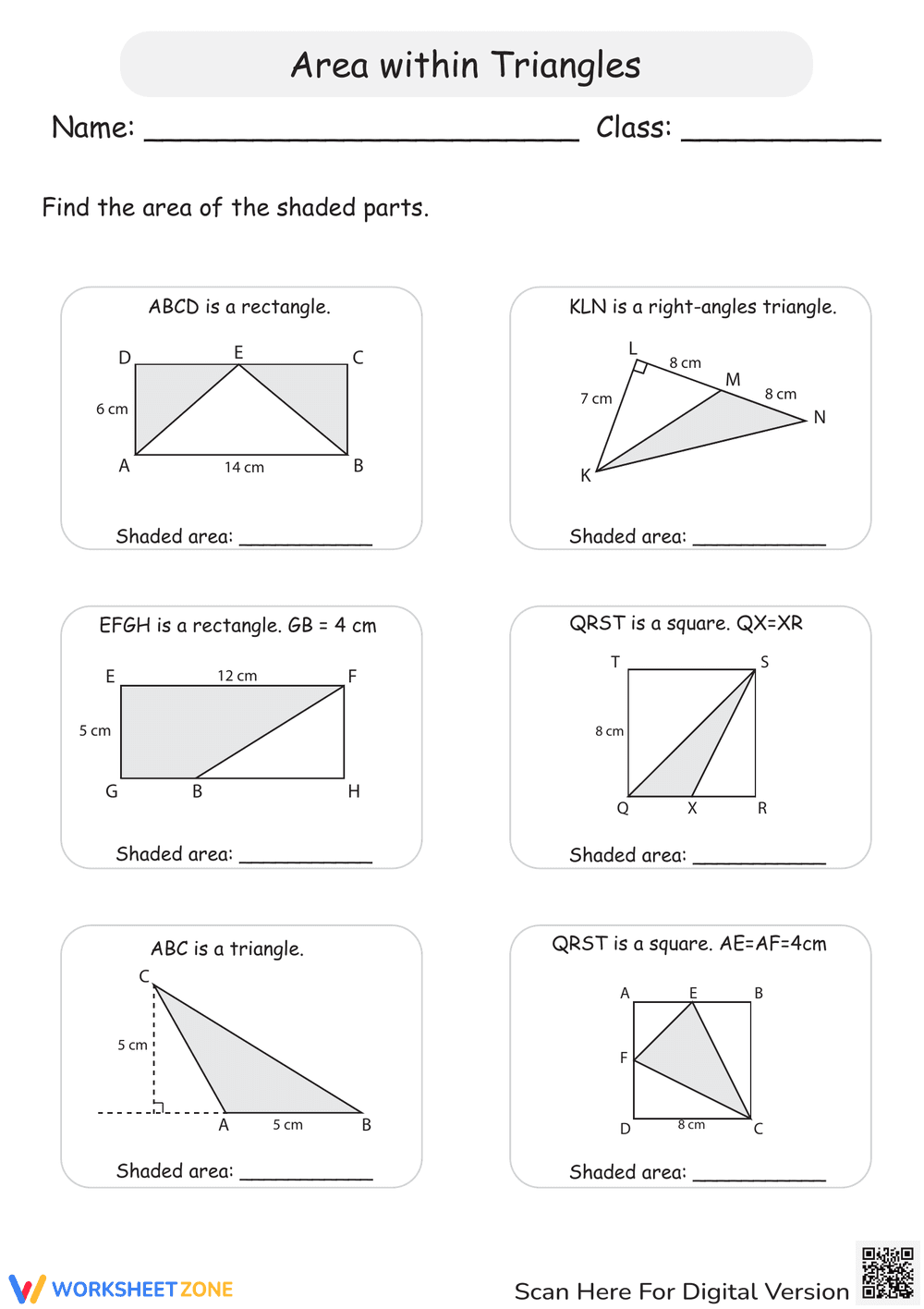
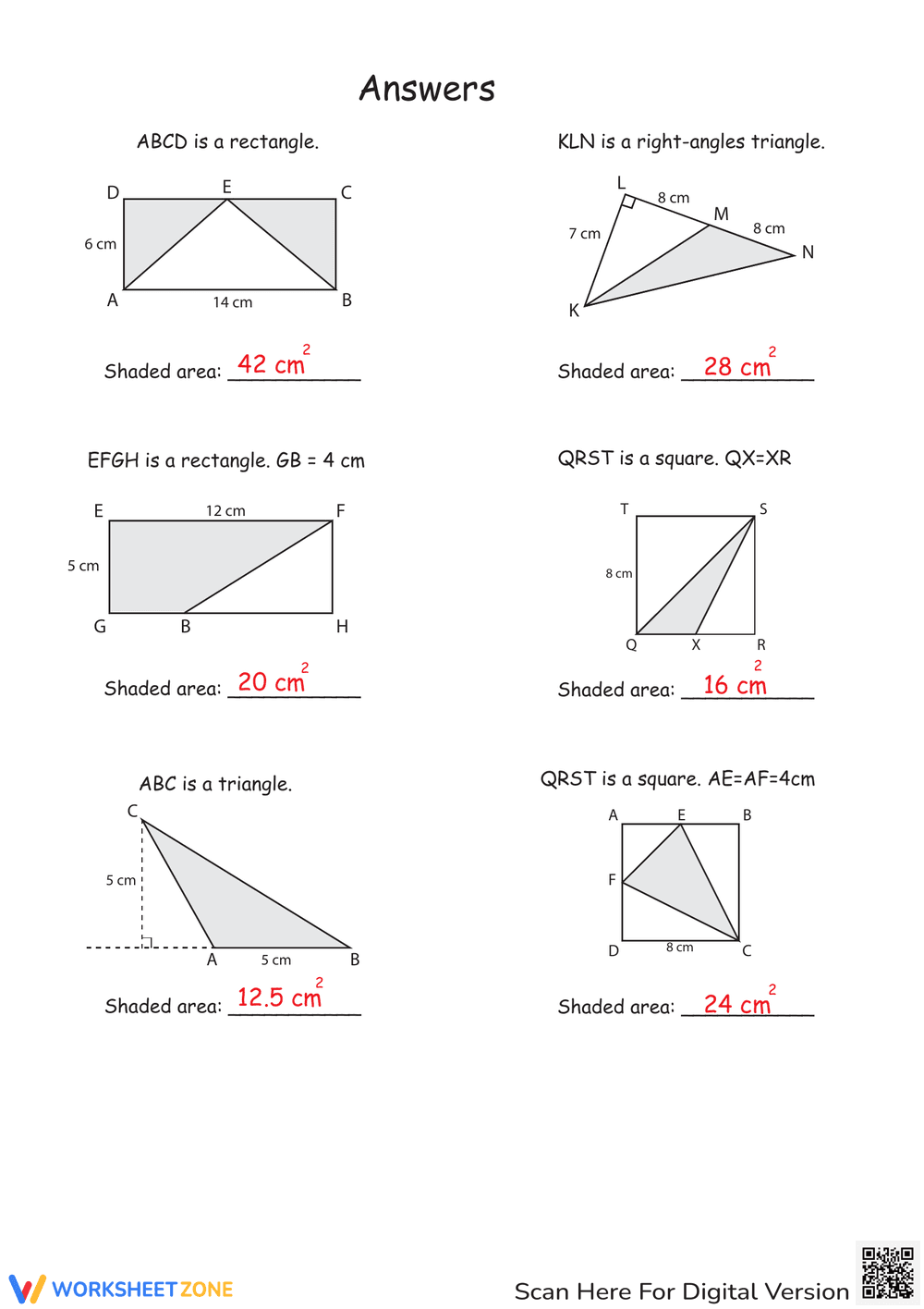
This is a math worksheet titled 'Area within Triangles'. It presents six different geometric figures, including rectangles, right triangles, squares, and regular triangles. Students are asked to find the area of the shaded regions within each figure, requiring them to apply formulas for the area of triangles and rectangles, and possibly subtract areas to find the shaded region. The worksheet provides measurements in centimeters for each figure.
Grade Level Suitability:
This worksheet is suitable for grades 5-7. It requires understanding of basic geometric shapes and their area formulas. The problems involve some spatial reasoning and the ability to subtract areas, making it appropriate for upper elementary or middle school students.
Why Use It:
This worksheet reinforces the concept of area calculation for triangles, rectangles, and squares. It also develops problem-solving skills by requiring students to identify the relevant dimensions and apply the correct formulas. Finding the area of shaded regions encourages spatial reasoning and critical thinking.
How to Use It:
Students should first identify the shapes involved in each problem. They need to apply the appropriate area formulas (e.g., area of a triangle = 1/2 base height, area of a rectangle = length * width). If the shaded area is a portion of a larger shape, students will need to calculate the area of the larger shape and then subtract the area of the unshaded portion to find the shaded area. Finally, they should write the answer in the provided space.
Target Users:
This worksheet is ideal for students learning about area calculation in geometry. It's also useful for teachers looking for practice problems to reinforce these concepts or for homeschooling parents supplementing their math curriculum. It can be used for classwork, homework, or review.
This is a math worksheet titled 'Area within Triangles'. It presents six different geometric figures, including rectangles, right triangles, squares, and regular triangles. Students are asked to find the area of the shaded regions within each figure, requiring them to apply formulas for the area of triangles and rectangles, and possibly subtract areas to find the shaded region. The worksheet provides measurements in centimeters for each figure.
Grade Level Suitability:
This worksheet is suitable for grades 5-7. It requires understanding of basic geometric shapes and their area formulas. The problems involve some spatial reasoning and the ability to subtract areas, making it appropriate for upper elementary or middle school students.
Why Use It:
This worksheet reinforces the concept of area calculation for triangles, rectangles, and squares. It also develops problem-solving skills by requiring students to identify the relevant dimensions and apply the correct formulas. Finding the area of shaded regions encourages spatial reasoning and critical thinking.
How to Use It:
Students should first identify the shapes involved in each problem. They need to apply the appropriate area formulas (e.g., area of a triangle = 1/2 base height, area of a rectangle = length * width). If the shaded area is a portion of a larger shape, students will need to calculate the area of the larger shape and then subtract the area of the unshaded portion to find the shaded area. Finally, they should write the answer in the provided space.
Target Users:
This worksheet is ideal for students learning about area calculation in geometry. It's also useful for teachers looking for practice problems to reinforce these concepts or for homeschooling parents supplementing their math curriculum. It can be used for classwork, homework, or review.


